Revising Pathology From Lecture Slides: A Mind Map Walkthrough
Pathology, biochemistry and biology lectures share a problem. The slides are dense, the terms pile up, and the same process shows up in four different lectures. This is a walkthrough of revising a deck like that with a mind map. The example is a made-up deck on acute inflammation, used to show the method. It is not a real student's story.
The problem with dense slides
A lecture on acute inflammation might cover the blood vessel changes, the chemical signals, the white cells that arrive, and what happens afterwards. On slides, that is 40 pages of lists and diagrams. When you reread them, everything looks familiar, so everything feels known.
Then the exam asks you to put the steps of white cell recruitment in order, and you cannot.
Step 1: Turn the deck into a map
Save the slides as a PDF, open forkai.in on your phone, sign in, tap the document icon and pick the file. New accounts start with $5 of free credit. fork ai reads the text, builds a map with a main node and branches, and writes notes in each one. The full steps are in turning a lecture PDF into a mind map.
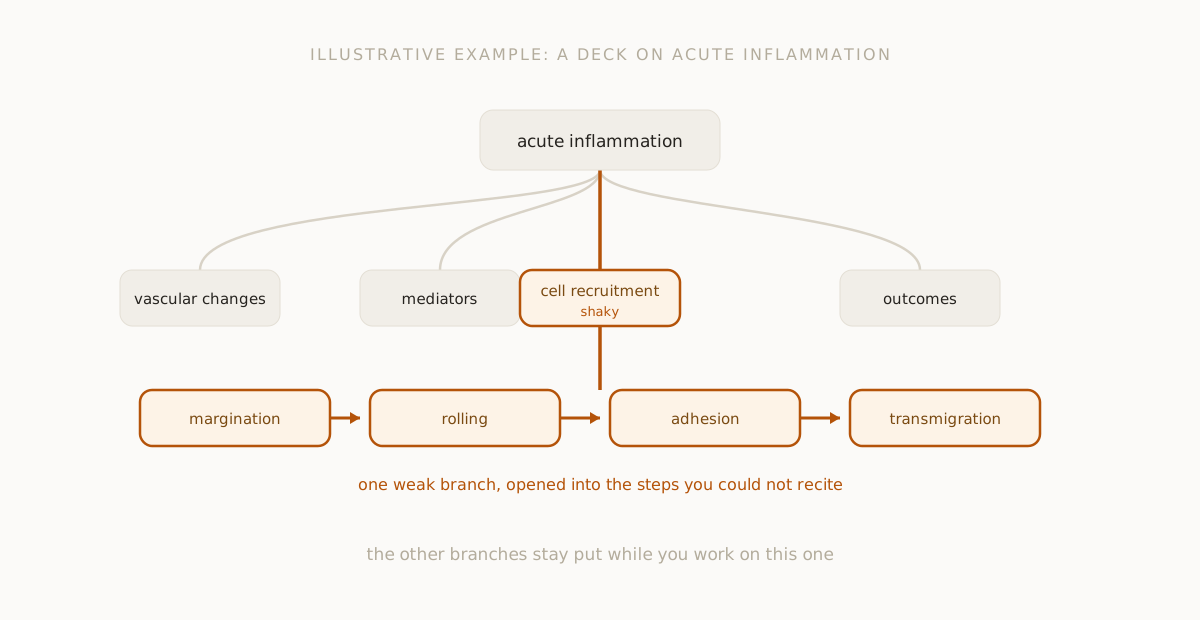
For a deck like this one, you might see branches such as vascular changes, mediators, cell recruitment and outcomes. The actual branches depend on your file, so yours will differ.
Two things to know first. The app reads up to about 40,000 characters, or the first 50 pages of a text PDF, so split a long deck into two uploads. And pictures and labelled diagrams are not read as text, so a slide that is mostly a diagram will give the map very little. Keep that slide open next to your phone.
Step 2: Sort what you know
Before reading any notes, look at the four branch titles and be honest.
- Vascular changes: you can describe them.
- Mediators: you know a few names and not what each does.
- Cell recruitment: you remember that white cells "go to the site" and nothing else.
- Outcomes: you know the list but not what decides which one happens.
That sorting is the useful result. Three branches need work and one of them is the worst. Start there.
Step 3: Open the weakest branch
Open cell recruitment and read the notes. Suppose they describe white cells moving out of the blood vessel, and one sentence loses you. Highlight it and tap Ask AI. You might ask:
- "Put these steps in order and say what happens in each."
- "Why do the cells slow down before they leave the vessel?"
- "What is the difference between this step and the one before it?"
The answer becomes a new branch attached to that sentence. The usual order taught for this process is margination, rolling, adhesion and then transmigration, so check what comes back against your own slides and textbook. If your lecturer uses different terms, use theirs.
Notes written by an AI can be wrong in the details, and detail is where medical and science exams mark you. Treat the branch as a first explanation. Confirm names, steps and numbers against your course material.
Step 4: Say it back without looking
Close the branch. Say or write the four steps from memory, and one line on what each does. If you stall on one, that is where to ask again. This is slower than rereading and it is the part that shows you what you do not know.
For why that works, see how to revise from a mind map, which also has the research behind testing yourself.
Step 5: Use the same trick across subjects
The same loop works on other dense material.
- Biochemistry: a metabolic pathway deck becomes a map of the pathway's stages. Open the stage you cannot name the enzymes of, and ask about it one step at a time.
- Biology: a lecture on cell signalling becomes branches by stage or by molecule type. Highlight the term you keep mixing up and ask for the difference.
- Pathology: one deck per disease process, and a branch per mechanism.
In each case you upload one lecture at a time, sort the branches, and open the weak ones. It does not replace the lecture, the textbook or practice questions. It helps you find the gaps in your own understanding faster.
What to be careful about
- Names and numbers. Check them. A wrong enzyme or a wrong threshold costs marks.
- Clinical or safety use. This is for revision. Do not use it to make decisions about real patients or treatment.
- Diagrams. If a slide is mostly a picture, the map will not capture it.
- Credit. Each note and question uses some of your credit, so stay on the branches you need.
If you want a general overview of using AI for study, studying with AI is the place to start. For how a map holds a subject together, read concept maps with AI.
Questions people ask
Will it work on slides full of diagrams? Only for the text. Labels inside images are not read as text, so keep the diagram slides open yourself.
Can I upload a photo of a lecture slide? Images are accepted and read for text, in English. Clear, flat, well-lit shots work best.
Is it accurate enough for medical or science exams? It is a good first explanation, not a source of record. Check names, steps and numbers against your own material.
Does it make practice questions? No. It does not make flashcards or quizzes. You ask on a branch, and you test yourself by explaining it back.
Your next step
Upload one lecture. When the map appears, open the one branch you could least explain this morning.
fork ai turns any question into a branching map you can explore, highlight, and keep. Try it free.
Start researching →