Studying With AI: Turn Any Subject Into a Branching Study Map
There are a lot of AI study tools now, and most of them do the same thing: answer your questions. That's useful, but answering questions isn't studying — it's looking things up. A study tool worth the name should help you build understanding you keep, which means turning a subject into a structure you can explore, review, and remember. Here's how to study with AI properly.
Answering questions isn't studying
When you paste a homework question into a chatbot and read the answer, you've outsourced the thinking and learned almost nothing. The information passed through you without leaving a trace. This is the trap of treating AI as an answer machine: it feels productive and produces no understanding. Tomorrow you couldn't reconstruct the explanation, because you never built anything — you just read.
Real studying is active and structural. You break a subject into parts, see how they connect, work through the hard spots yourself, and revisit until it sticks. A good AI study tool should support that, not replace it.
Turn the subject into a map
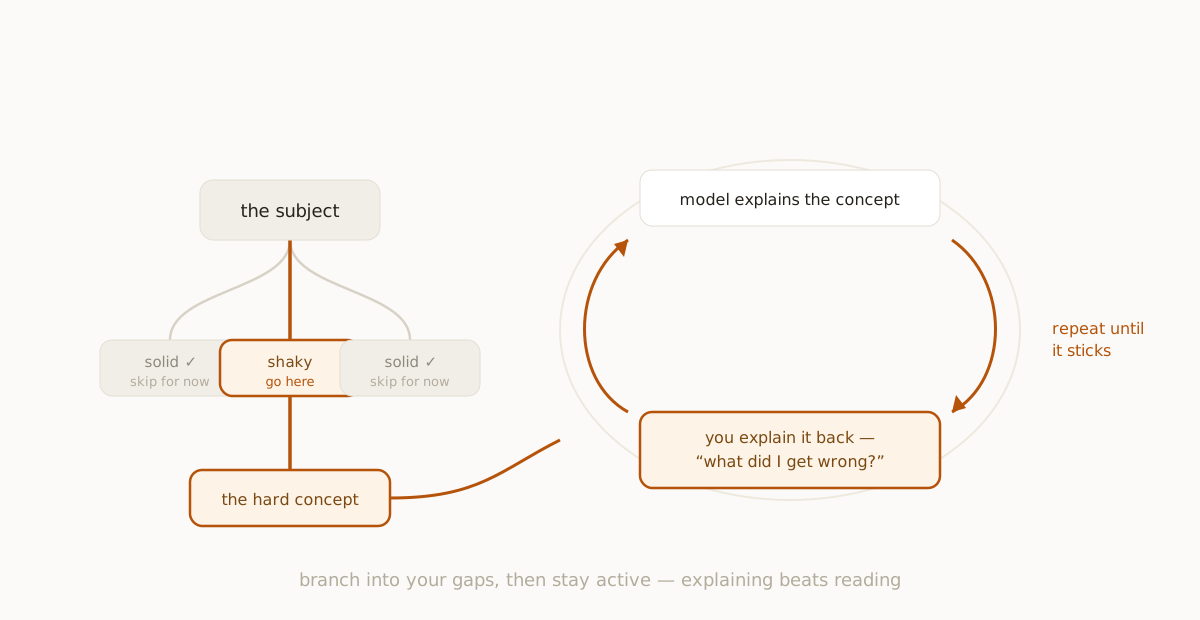
Start by asking the AI to break your subject into its main areas — not one big explanation, but a handful of distinct topics. Now you have a map to explore instead of a paragraph to skim. Pick the area you're shakiest on and branch into it. Within it, branch again into the specific concept giving you trouble. You're decomposing the subject the way studying actually requires, and the AI is filling in each piece as you go.
This branching structure is the core of any effective research workflow, and it works just as well for a syllabus as for a research question. Each branch is a sub-topic; each node is something you chose to dig into; the whole thing is a study map of the subject in the shape of your own gaps.
Stay active: explain, don't just read
The single highest-leverage study habit with AI is to make yourself the explainer. After the model lays out a concept, branch a node where you explain it back, then ask the AI to check you. "Here's my understanding — what did I get wrong?" This flips you from passive reader to active participant, which is the entire difference between studying and skimming. The model becomes a tutor that quizzes and corrects rather than a textbook that lectures.
Because you built the structure by choosing where to branch and where to explain, you remember it. We retain what we construct far better than what we're handed.
Build in review
Studying without review is just forgetting on a delay. The advantage of a study map over a chat log is that it's revisitable — you can come back and walk the structure, and the spatial layout reloads what each node contains. Schedule yourself to return to a map a day later, then a few days after that. Each pass, branch a quick self-test node and see what you've actually retained versus what's faded. This is spaced repetition applied to understanding, not just flashcard facts.
Why students should keep their maps
The biggest mistake students make with AI is letting every session vanish. You study for an exam, the chat scrolls away, and three weeks later you're starting from zero. A study tool that lets you keep your maps turns a semester of sessions into a growing body of knowledge — last month's map is one click from this week's, and the connections between subjects start to show.
How to study with AI, in short
- Ask for the subject's main areas; don't accept one block of text.
- Branch into the areas you're weakest on, then into specific concepts.
- Explain concepts back and have the AI check you — stay active.
- Branch self-tests, and revisit the map on a schedule.
- Keep your maps so the work compounds across the term.
Used this way, AI stops being a shortcut that hollows out your learning and becomes what a study tool should be: something that helps you build understanding solid enough to last past the exam.
fork ai turns any question into a branching map you can explore, highlight, and keep. Try it free.
Start researching →