How to Run a Literature Review With AI (Without Drowning)
A literature review is where research either gets organized or gets overwhelming. The field is large, the sources don't agree, and everything connects to everything. AI can make this dramatically faster — or dramatically messier, if you let it dump unstructured summaries into a chat. Here's how to run a literature review with AI without drowning in it.
Map the field before you read it
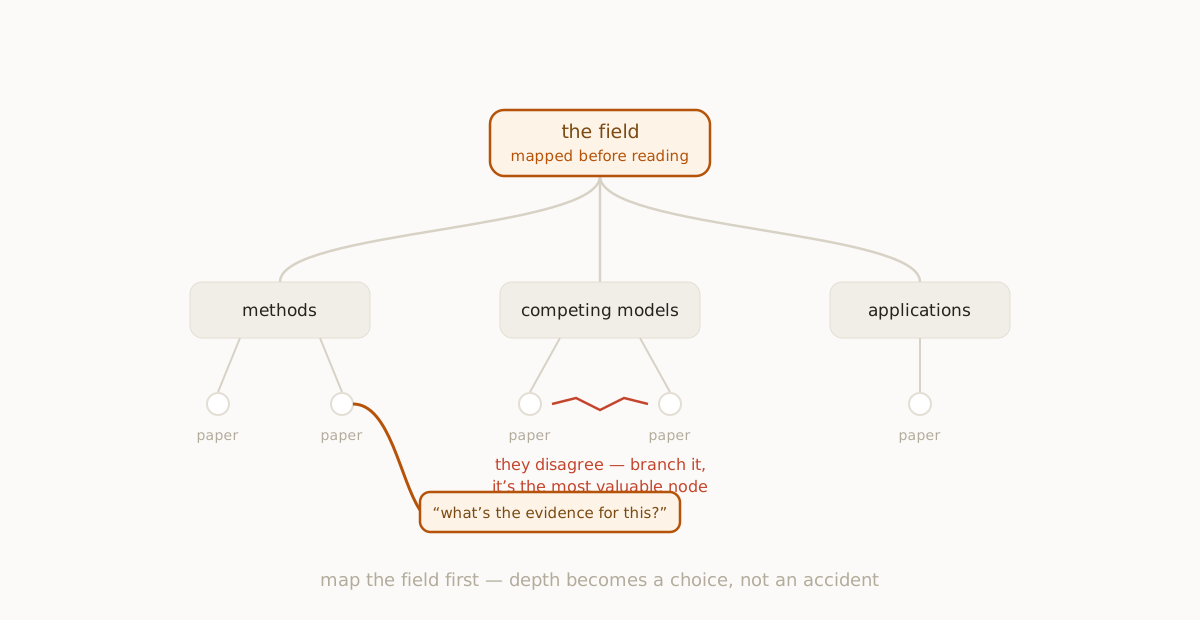
The instinct is to start reading and take notes. Resist it. Before you go deep on any single paper or idea, ask the AI to lay out the shape of the field: the major schools of thought, the central debates, the seminal results, the open questions. You're not looking for answers yet — you're looking for a map of where the answers live.
This top-down pass does two things. It tells you what you're skipping when you choose where to focus, and it gives you a structure to hang every later note on. It's the same breadth-first principle behind any good AI research workflow: understand the territory, then choose your depth deliberately.
Branch each sub-topic into its own thread
Once you have the field mapped into a handful of areas, branch each one into its own node. The debate over methodology becomes a thread. The competing models become a thread. The applications become a thread. Now the review has a skeleton, and each branch can grow independently without tangling into the others.
This is where a branching workspace earns its keep over a linear chat. In a transcript, the methodology discussion and the applications discussion bleed together as you scroll. As branches, they stay distinct — you can go three levels deep on one without losing your place in the others.
Keep every claim attached to its source
The hazard of AI-assisted review is fluent, sourceless summary. The model produces a confident paragraph and you have no idea which paper it came from — or whether it came from a paper at all. Two practices keep you honest:
- Prefer web-search or citation-capable modes for factual claims, so summaries arrive with somewhere to verify them.
- Branch a node to interrogate any claim you'll rely on. "What's the evidence for this? Who disputes it?" A branch dedicated to one claim is easy to check; a sentence buried in a wall of text is not.
The goal isn't to trust the AI's summary. It's to use the AI to find and organize the territory faster, then verify the parts that matter.
Capture the disagreements, not just the consensus
A good literature review is defined by how well it handles conflict — competing findings, methodological disputes, unresolved questions. AI is genuinely useful here because you can ask it directly: "Where do these two approaches disagree, and why?" Branch that question into its own node and you've captured the most valuable part of any review — the live edge of the field — as a first-class part of your map rather than a footnote.
The map is the deliverable
When you're done, you don't want a chat history. You want a structured artifact: the field mapped into areas, each area branched into its sources and debates, each contested claim flagged with a thread that interrogates it. That's a knowledge map of the literature — and unlike a transcript, it's something you can navigate, extend, and hand to someone else.
It's also durable. Export it, and next month when you pick the project back up, you start from the map instead of from scratch — the foundation of any real second brain. The reading was the work; the map is what makes the reading pay off twice.
A simple sequence to follow
- Ask for the shape of the field, split into areas.
- Branch each area into its own thread.
- Within each thread, go deep on sources, methods, and findings.
- Branch a dedicated node for every claim you'll cite, and verify it.
- Branch the disagreements explicitly — they're the most valuable nodes.
- Keep the whole map; don't let it die in a chat log.
Run a review this way and AI stops being a firehose of summaries and becomes what it should be: a fast way to see the whole field, organized the way you need it.
fork ai turns any question into a branching map you can explore, highlight, and keep. Try it free.
Start researching →