From Research Map to Notion: Exporting AI Research You Can Keep
AI research has a permanence problem. You do an hour of genuinely good work — branching through a topic, building a structured map of answers — and it lives inside a single web session. Close the tab a few times, move on to other projects, and it's effectively gone. The fix is to get research out of the tool that made it and into a place you already keep things. For a lot of people, that place is Notion.
Why research needs to outlive the session
A research session that can't leave its tool isn't an asset; it's a moment. The whole argument for building a structured knowledge map instead of a throwaway chat is that the map is worth keeping — but "keeping" only counts if you can store it somewhere durable, searchable, and connected to the rest of your work.
This is the difference between a tool you visit and a second brain you build. The second brain only works if knowledge accumulates somewhere permanent. Export is what makes accumulation possible.
What a good export preserves
The naive way to "save" AI research is to copy-paste the text. That throws away the most valuable part — the structure. A flat dump of paragraphs loses which answer came from which, where you branched, and how the pieces connect. You're left with the content stripped of the shape that made it understanding.
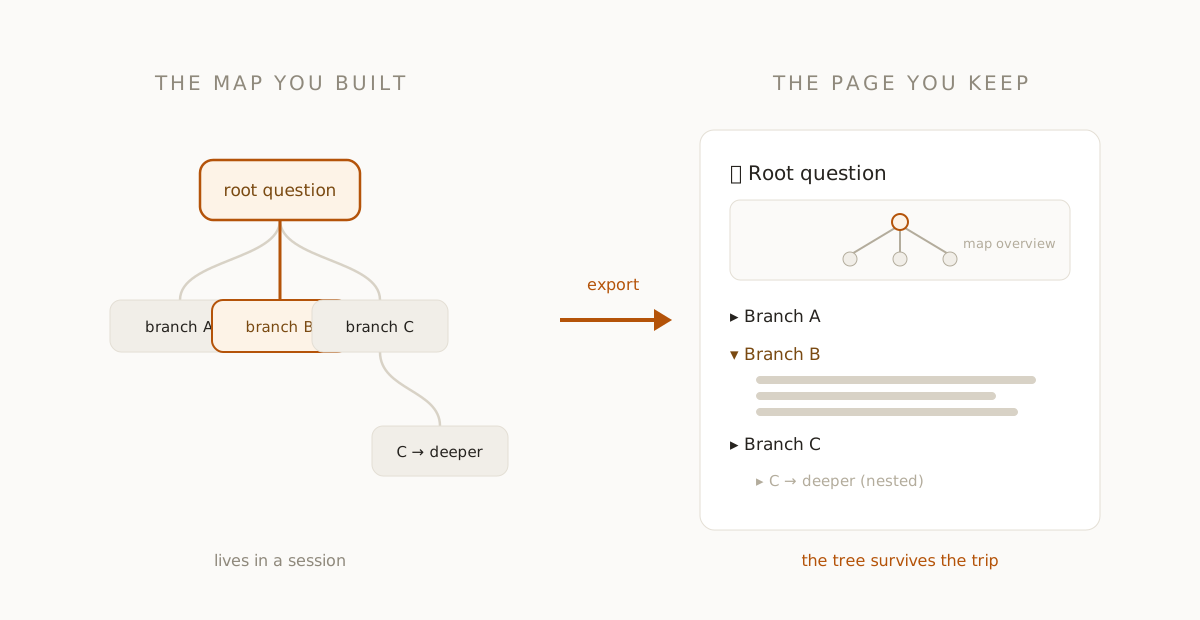
A proper export preserves the map. The branching structure of your research should survive the trip, so the exported page reflects the same tree you built: the root question, its sections, and the branches that grew off them, nested the way you explored them. The structure is the point; an export that drops it isn't worth doing.
Notion as the destination
Notion is a natural home for exported research because it's already where so much knowledge work lives, and its block model maps cleanly onto a research tree. A branching map can land as a structured Notion page: a visual overview of the map at the top, followed by collapsible sections for each branch, so the page is both a summary and a drill-down. Toggle headings keep a large research tree from overwhelming the page — collapsed by default, expandable when you want the detail.
Once it's in Notion, the research joins everything else you keep there. It's searchable alongside your other notes, linkable from your projects, and durable in a way a browser session never is. The hour of branching research becomes a permanent page instead of a closed tab.
Keep the workflow, change the storage
None of this changes how you do the research. You still follow the same branching workflow: ask a real question, let the answer split into sections, branch the ones that matter, go deep where your curiosity pulls. The export is the last step, not a different process. You research in a tool built for branching and exploration, then push the finished map somewhere built for long-term storage. Right tool for each half of the job.
Research you can actually build on
The deeper benefit of exporting is that it lets research compound across projects. A map you finished last month, sitting in Notion, is there when this month's related project starts — you can reference it, link to it, or pull its conclusions into new work. Research stops being a series of disconnected sessions and becomes a growing library, which is the entire promise of a second brain.
If your AI research keeps evaporating the moment you close the tab, the missing piece isn't a better model or a longer prompt — it's a way out. Do the work as a structured map, then send it somewhere permanent. The session ends; the knowledge stays.
fork ai turns any question into a branching map you can explore, highlight, and keep. Try it free.
Start researching →