What Does the GUI for LLMs Look Like?
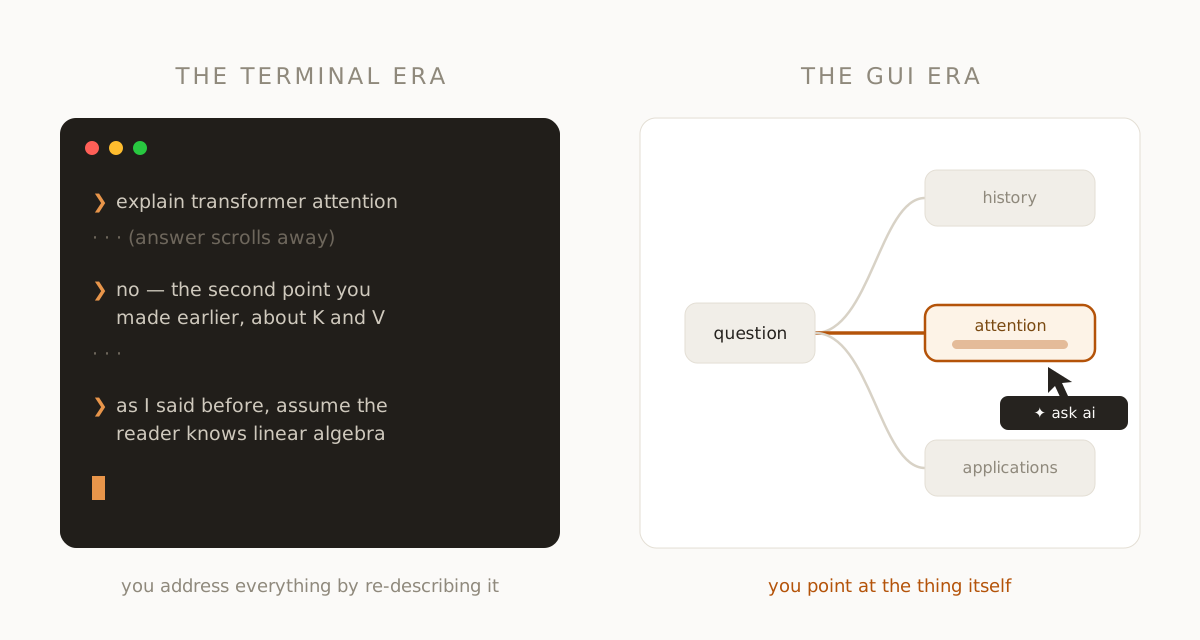
Chat is the command line of AI. It's powerful, it's general, and it makes you type everything. You hold the whole state of the session in your head, you address the machine in carefully composed strings, and the output scrolls away as fast as it arrives. We are, interface-wise, in the terminal era of LLMs — and almost nobody seems bothered that the most capable software ever built is operated through a text prompt.
The command line never died, and chat won't either. But the command line stopped being how most people use computers the moment the GUI arrived. So it's worth asking the question seriously: what does the GUI for LLMs actually look like?
What the GUI actually changed
The graphical interface wasn't about prettiness. It changed three things. Visible state — files and folders you could see instead of remember. Direct manipulation — pointing at the thing itself instead of naming it in a command. Spatial persistence — your work stayed where you put it, so the screen became an extension of memory rather than a scroll of history.
Measure chat against those three and it fails all of them. The state of an AI session — what's been established, what's open, what depends on what — is invisible, smeared across a transcript. You can't point at anything; to refer to an earlier idea you re-describe it in prose, the exact thing direct manipulation abolished. And nothing persists spatially: yesterday's insight is wherever it happens to be in the scrollback.
The desktop metaphor doesn't transfer — the principles do
The lazy answer is to bolt familiar chrome onto chat: buttons that insert prompts, sidebars, template galleries. That's skinning the terminal, not building the GUI. Files-and-folders was the right metaphor for documents. The native output of an LLM is something else: answers that spawn questions. A unit of AI work has a parent (what prompted it), children (what it provoked), and content worth keeping. That's not a desktop. That's a tree.
So apply the three principles to that shape — this is, concretely, what we built fork.ai to be. Visible state becomes a map of the inquiry — every answer a node, every branch a relationship you can see at a glance, the way a mind map carries structure that a list can't. Direct manipulation becomes acting on the answer itself: in fork.ai you highlight a sentence and ask about it, or take a section and go deeper on it — the selection is the referent, no re-describing required. Spatial persistence means the session survives as a navigable artifact, where "that branch about pricing" is a place you return to, not a string you search for.
There's a quieter principle hiding in there too. In a GUI, pointing is addressing — and for an LLM, addressing is context. When you branch from a highlighted passage, the interface knows exactly what the subject is and exactly which lineage of questions led there. The GUI for LLMs isn't just friendlier; it's a context-scoping machine, assembling for every question precisely the slice of the session that's relevant.
Why this is hard to see from inside chat
Engelbart demoed the essentials of modern computing in the 1968 "Mother of All Demos"; the GUI still took fifteen years to reach desks, partly because the terminal felt complete to the people fluent in it. Chat feels complete the same way. The friction — context you re-explain, threads you lose, transcripts you never reopen — reads as the cost of using AI rather than the cost of one particular interface to it.
It isn't. Every one of those frictions is an interface defect, and interface defects get fixed. Some of the fix is conversational, some is agents doing work off-screen — but the part where a person explores and understands something has a shape, and the shape is visible, branching, and spatial.
The honest answer
So: what does the GUI for LLMs look like? Like watching your own thinking get laid out as you go. You ask; the answer arrives as structure, not scroll. You touch the part that interests you and the inquiry grows in that direction, on a map that is the state of the session. Nothing to memorize, nothing to re-explain, nothing lost off the top of the screen. That's not a thought experiment — it's a description of a fork.ai session, and you can try it today.
The terminal asked you to learn its language. The GUI learned yours. Chat asks you to hold the structure of your thinking in your head. The next interface holds it for you — and once you've worked that way, going back to the scroll feels exactly like going back to the command line.
fork ai turns any question into a branching map you can explore, highlight, and keep. Try it free.
Start researching →